Wednesday, January 23, 2008


Thursday, December 20, 2007
GENERATIONS OF LANGUAGES
We know that computer is a dumb machine. It cannot do anything on its own. For getting any work done from the computer, you need to give instructions to the computer. These instructions are given in a language, which computer can understand. Just as we use some language to communicate with each other, you need some computer language to communicate with computer. There are different computer languages which are classified into Five Generations.

1GL or first-generation language is machine language. In this language the programs are written in the form of ‘0’ and ‘1’. 0 and 1 are the binary numbers which the computer understands. Machine languages are the only languages understood by computers directly. This language is Machine dependent. This means every CPU has its own unique machine language. Programs written on one computer may not run on another computer. Programs must be rewritten or recompiled, therefore, to run on different types of computers.
2GL or second-generation language is assembly language. This language uses mnemonics codes or symbols in place of 0’s and 1’s. A mnemonic is an alphabetical abbreviation used as a memory aid. A typical assembly instruction looks like this:
ADD 12,8
Since the computer can only understand machine language directly, an assembler converts the assembly language statements into machine language.
Assembly language is also machine-dependent and programming in this language is also very tedious.
1GL and 2GL are also known as “Low-Level Languages”.
3GL or third-generation language is a "high-level programming language”, such as PL/I, C, or Java. The disadvantage of the low level language led to the development of the high level languages. This is a programming language designed to be easier for a human to understand, including things like named variables. A typical instruction may look like:
let b = c + 2 * d
A compiler converts the statements of a specific high-level programming language into machine language. A 3GL language requires a considerable amount of programming knowledge.
4GL or fourth-generation language is designed to be closer to natural language than a 3GL language. Languages for accessing databases are often described as 4GLs. A 4GL language statement might look like this:
EXTRACT ALL CUSTOMERS WHERE "PREVIOUS PURCHASES" TOTAL MORE THAN $1000
5GL or fifth-generation language is designed to make the computer solve the problem for you whereas fourth-generation programming languages are designed to build specific programs. 5GL programming uses a visual or graphical development interface to create source language that is usually compiled with a 3GL or 4GL language compiler. Fifth-generation languages are used mainly in artificial intelligence research. Prolog, OPS5, and Mercury are the best known fifth-generation languages.
1GL or first-generation language is machine language. In this language the programs are written in the form of ‘0’ and ‘1’. 0 and 1 are the binary numbers which the computer understands. Machine languages are the only languages understood by computers directly. This language is Machine dependent. This means every CPU has its own unique machine language. Programs written on one computer may not run on another computer. Programs must be rewritten or recompiled, therefore, to run on different types of computers.
2GL or second-generation language is assembly language. This language uses mnemonics codes or symbols in place of 0’s and 1’s. A mnemonic is an alphabetical abbreviation used as a memory aid. A typical assembly instruction looks like this:
ADD 12,8
Since the computer can only understand machine language directly, an assembler converts the assembly language statements into machine language.
Assembly language is also machine-dependent and programming in this language is also very tedious.
1GL and 2GL are also known as “Low-Level Languages”.
3GL or third-generation language is a "high-level programming language”, such as PL/I, C, or Java. The disadvantage of the low level language led to the development of the high level languages. This is a programming language designed to be easier for a human to understand, including things like named variables. A typical instruction may look like:
let b = c + 2 * d
A compiler converts the statements of a specific high-level programming language into machine language. A 3GL language requires a considerable amount of programming knowledge.
4GL or fourth-generation language is designed to be closer to natural language than a 3GL language. Languages for accessing databases are often described as 4GLs. A 4GL language statement might look like this:
EXTRACT ALL CUSTOMERS WHERE "PREVIOUS PURCHASES" TOTAL MORE THAN $1000
5GL or fifth-generation language is designed to make the computer solve the problem for you whereas fourth-generation programming languages are designed to build specific programs. 5GL programming uses a visual or graphical development interface to create source language that is usually compiled with a 3GL or 4GL language compiler. Fifth-generation languages are used mainly in artificial intelligence research. Prolog, OPS5, and Mercury are the best known fifth-generation languages.
Wednesday, December 12, 2007
DATA REPRESENTATION
In digital systems like computers, quantities are represented by symbols called digits.
Various number systems being used in digital systems are:
1. Binary Number System
consists of two numbers: 0,1
2. Decimal Number System
consists of 10 numbers: 0 to 9
3. Octal Number System
consists of 8 numbers: 0 to 7
4. Hexadecimal Number System
consists of 16 numbers: 0 to 9 and A, B, C, D, E, F
A, B, C, D, E, F are the equivalents of number : 10, 11, 12, 13, 14, 15 respectively
IMPORTANT POINTS


Ans. (31.5146) base 8


Ans: 25.875 base 10

Ans. 234.64025 base 10
 Ans: AE.5C base 16

Various number systems being used in digital systems are:
1. Binary Number System
consists of two numbers: 0,1
2. Decimal Number System
consists of 10 numbers: 0 to 9
3. Octal Number System
consists of 8 numbers: 0 to 7
4. Hexadecimal Number System
consists of 16 numbers: 0 to 9 and A, B, C, D, E, F
A, B, C, D, E, F are the equivalents of number : 10, 11, 12, 13, 14, 15 respectively
IMPORTANT POINTS
- Computer system understands only the binary system as all the components of the computer like transistors, switches, ports, etc. work on the two-state process of On and Off.
- Decimal Number system is not conveneint to implement in digital systems as it is difficult to design an electronic equipment that can work with 10 different voltage levels.
- Advantage of using Octal and Hexadecimal number systems is:
a) easy to represent big numbers whereas representing big numbers in binary is complex.
b) Decimal system is not used to represent big numbers because conversion from binary to octal and hexadecimal is simple as compared to conversion from binary to decimal and viceversa. Also the converison from binary to decimal is not accurate.
NUMBER CONVERSIONS
1. DECIMAL TO BINARY
Divide the integral part by the base number into which you want to convert till you get '0' as the quotient and write the remainders on the side.
Now move from bottom to top to write the remainders which is the binary equivalent of the integral number.
Multiply the fractional part with the base number into which you want to convert.
Write the integral value on the side and further multiply the fractional part by the base number into which you want to convert till you get '0' in the fraction.
Now move from top to bottom to write the integral values which are binary equivalent of the fractional part.
You may notice that in case of converting fractional part of Decimal system to Binary system, you may not get '0' in the final. So, you need to stop the multiplication process after 3 to 4 levels.
As a result Decimal to Binary conversion does not give you accurate results.
Example:
1. (15.25) to the base 10 into binary number.
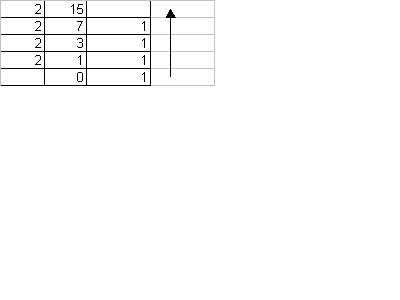
 Ans. (15.25) base 10 = (1111.01) base 2
2. (25.243) base 10 to base 2
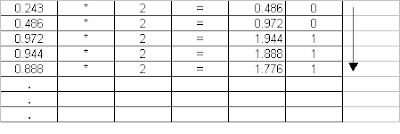
Ans. (10001.00111) base 2
NOTE: You can see clearly in the example above that the conversion from Decimal to Binary is not accurate. For that matter even conversion from Decimal to Octal or Hexadecimal may not be accurate. This is one of the reasons for using Octal and Hexadecimal systems in Digital systems as the conversion from Decimal to Binary, Octal and Hexadecimal is not accurate.
2. DECIMAL TO OCTAL
The process of converting is the same given above for Decimal to Binary conversion. See the example below.Example: (25.650) base 10 to base 8
Ans. (31.5146) base 8
3. DECIMAL TO HEXADECIMAL
The process of converting is the same given above for Decimal to Binary conversion. See the example below.
Example: (747.03125) base 10 to base 16 Ans. (2EB.08) base 16
4. BINARY TO DECIMAL
Pick the integer part and move in right to left direction, picking each element. Multiply each element with the base number from which you are converting to the power starting from '0' and increasing the power as you move from right to left.
Now pick the fractional part and move in left to right direction, picking each element. Multiply each element with the base number from which you are converting to the power starting from '-1' and increasing the power as you move from left to right.
Example: 11001.111 base 2 to base 10
Ans: 25.875 base 10
5. OCTAL TO DECIMAL
The conversion process remains the same as given above except that the digits will be multiplied by the base number of Octal 1.e. number 8.
Example: 352.51 base 8 to base 10
Ans. 234.64025 base 10
6. HEXADECIMAL TO DECIMAL
The conversion process is the same as above except that the digits will be multiplied by the number 16 i.e. base of the number to be converted.
Example: ABF.51 base 16 to base 10

Ans. 2752.31640625 base 10
7. BINARY TO OCTAL
Let us first write the Binary equivalents of Octal digits
0. 000
1. 001
2. 010
3. 011
4. 100
5. 101
6. 110
7. 111
NOTE: In Octal number system the numbers are to be represented in 3 bit form.
The process of conversion is as follows:
Pick the integer part and move from right to left making groups of 3. If the digits are less then add 0's to the left hand side.
Pick the fractional part and move from right to left and make groups of 3. If the digits are less then add 0's to the right hand side.
Now write the Octal value corresponding to the binary groups formed.
Example:
8. BINARY TO HEXADECIMAL
Let us first write the Binary equivalents of Hexadecimal digits
0. 0000
1. 0001
2. 0010
3. 0011
4. 0100
5. 0101
6. 0110
7. 0111
8. 1000
9. 1001
10. ( A ) 1010
11. ( B ) 1011
12. ( C ) 1100
13. ( D ) 1101
14. ( E ) 1110
15. ( F ) 1111
NOTE: In Hexadecimal number system the numbers are to be represented in 4 bit form.
The process of conversion is as follows:
Pick the integer part and move from right to left making groups of 4. If the digits are less then add 0's to the left hand side.
Pick the fractional part and move from right to left and make groups of 4. If the digits are less then add 0's to the right hand side.
Now write the Hexadecimal value corresponding to the binary groups formed.
Example:
Ans: AE.5C base 169. OCTAL TO BINARY
Pick each digit from the number and Simply write the binary equivalent ( represented in 3 bit form ) of the digit given.
Example:
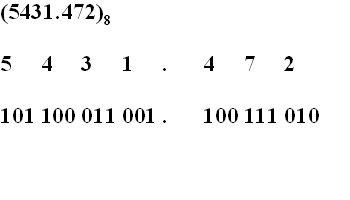
Ans. 101100011001.100111010 base 2
10. HEXADECIMAL TO BINARY
Pick each digit from the number and Simply write the binary equivalent ( represented in 4 bit form ) of the digit given.
Example:
Ans: 0 0 1 0 1 0 1 1 1 1 1 1 . 0 1 0 1 1 1 0 0 base 2
11. OCTAL TO HEXADECIMAL
12. HEXADECIMAL TO OCTAL
Saturday, December 8, 2007
GENERATIONS OF COMPUTER (on the basis of hardware developments)
FIRST GENERATION
TIME PERIOD : 1940's-1950's
TECHNOLOGY USED : Vacuum Tubes
SIZE AND SPEED : Huge, taking up entire rooms, Slow speed
LANGUAGE USED : Machine language
COST : System and working cost very high.
OTHER FEATURES : Used a great deal of electricity. Generated a lot of heat. Input was based on punched cards and paper tape, and output was displayed on printouts.
EXAMPLE : UNIVAC and ENIAC
SECOND GENERATION
TIME PERIOD : 1950's- 1960's
TECHNOLOGY USED : Transistors
SIZE AND SPEED : Lesser size and increased speed
LANGUAGE USED : Assembly language and languages like COBOL and FORTRAN
COST : Cost decreased
OTHER FEATURES : More efficient and reliable. Though the transistors still generated a great deal of heat that subjected the computer to damage, it was a vast improvement over the vacuum tube. Second-generation computers still relied on punched cards for input and printouts for output.
EXAMPLE : UNIVAC 1108, IBM 1401, CDC 1604
THIRD GENERATION
TIME PERIOD : late 1960's-1970's
TECHNOLOGY USED : Integrated Circuit
SIZE AND SPEED : Size Lesser and speed further increased
LANGUAGE USED : Operating System was developed.
COST : Cost decreased further
OTHER FEATURES : Instead of punched cards and printouts, users interacted with third generation computers through keyboards and monitors and interfaced with an operating system, which allowed the device to run many different applications at one time with a central program that monitored the memory. Computers for the first time became accessible to a mass audience because they were smaller and cheaper than their predecessors.
EXAMPLE : IBM-360 series, Honeywell Model 316, Honeywell – 6000 series, CDC – 1700.
FOURTH GENERATION
TIME PERIOD : 1970's-today
TECHNOLOGY USED : Microprocessor
SIZE AND SPEED : Reduced size and tremendous speed
LANGUAGE USED : High Level Languages like PASCAL, COBOL, C, C++, JAVA
COST : Reduced Cost
OTHER FEATURES : Microprocessors also moved out of the realm of desktop computers and into many areas of life as more and more everyday products began to use microprocessors. As these small computers became more powerful, they could be linked together to form networks, which eventually led to the development of the Internet. Fourth generation computers also saw the development of GUIs, the mouse and handheld devices.
EXAMPLE : Intel 4004, Apple Macintosh
FIFTH GENERATION
TIME PERIOD : 1990's -today
TECHNOLOGY USED : Microprocessor
SIZE AND SPEED : Reduced size and tremendous speed
LANGUAGE USED : Based on Artificial intelligence
COST : Reduced Cost
OTHER FEATURES : Fifth generation computing devices, based on artificial intelligence, are still in development, though there are some applications, such as voice recognition, that are being used today. The goal of fifth-generation computing is to develop devices that respond to natural language input and are capable of learning and self-organization.
EXAMPLE : Parallel Inference Machine
Note: Artificial Intelligence is the branch of computer science concerned with making computers behave like humans.
Note: Voice Recognition is the field of computer science that deals with designing computer systems that can recognize spoken words.
TIME PERIOD : 1940's-1950's
TECHNOLOGY USED : Vacuum Tubes
SIZE AND SPEED : Huge, taking up entire rooms, Slow speed
LANGUAGE USED : Machine language
COST : System and working cost very high.
OTHER FEATURES : Used a great deal of electricity. Generated a lot of heat. Input was based on punched cards and paper tape, and output was displayed on printouts.
EXAMPLE : UNIVAC and ENIAC
SECOND GENERATION
TIME PERIOD : 1950's- 1960's
TECHNOLOGY USED : Transistors
SIZE AND SPEED : Lesser size and increased speed
LANGUAGE USED : Assembly language and languages like COBOL and FORTRAN
COST : Cost decreased
OTHER FEATURES : More efficient and reliable. Though the transistors still generated a great deal of heat that subjected the computer to damage, it was a vast improvement over the vacuum tube. Second-generation computers still relied on punched cards for input and printouts for output.
EXAMPLE : UNIVAC 1108, IBM 1401, CDC 1604
THIRD GENERATION
TIME PERIOD : late 1960's-1970's
TECHNOLOGY USED : Integrated Circuit
SIZE AND SPEED : Size Lesser and speed further increased
LANGUAGE USED : Operating System was developed.
COST : Cost decreased further
OTHER FEATURES : Instead of punched cards and printouts, users interacted with third generation computers through keyboards and monitors and interfaced with an operating system, which allowed the device to run many different applications at one time with a central program that monitored the memory. Computers for the first time became accessible to a mass audience because they were smaller and cheaper than their predecessors.
EXAMPLE : IBM-360 series, Honeywell Model 316, Honeywell – 6000 series, CDC – 1700.
FOURTH GENERATION
TIME PERIOD : 1970's-today
TECHNOLOGY USED : Microprocessor
SIZE AND SPEED : Reduced size and tremendous speed
LANGUAGE USED : High Level Languages like PASCAL, COBOL, C, C++, JAVA
COST : Reduced Cost
OTHER FEATURES : Microprocessors also moved out of the realm of desktop computers and into many areas of life as more and more everyday products began to use microprocessors. As these small computers became more powerful, they could be linked together to form networks, which eventually led to the development of the Internet. Fourth generation computers also saw the development of GUIs, the mouse and handheld devices.
EXAMPLE : Intel 4004, Apple Macintosh
FIFTH GENERATION
TIME PERIOD : 1990's -today
TECHNOLOGY USED : Microprocessor
SIZE AND SPEED : Reduced size and tremendous speed
LANGUAGE USED : Based on Artificial intelligence
COST : Reduced Cost
OTHER FEATURES : Fifth generation computing devices, based on artificial intelligence, are still in development, though there are some applications, such as voice recognition, that are being used today. The goal of fifth-generation computing is to develop devices that respond to natural language input and are capable of learning and self-organization.
EXAMPLE : Parallel Inference Machine
Note: Artificial Intelligence is the branch of computer science concerned with making computers behave like humans.
Note: Voice Recognition is the field of computer science that deals with designing computer systems that can recognize spoken words.
Thursday, December 6, 2007
DATA TYPES IN C++

Click on the link below to see the graphical display of different types of data types available in C++.
http://www.freemindshare.com/map/fkvw57BDHW/
http://www.freemindshare.com/map/fkvw57BDHW/
Tuesday, December 4, 2007
OPERATORS AND EXPRESSIONS IN C++
The operations ( specific tasks ) are represented by Operators and the objects of the operation(s) are referred to as Operands.
There are different types of operators.

1. Arithmetic Operators:
to do arithmetic operations.
+, -, *, /, % are arithmetic operators.
Example: 6+7=13, 12%5=2.
There are 2 types of Arithemetic Operators:
a) Unary Operators
There are different types of operators.
Click here to see a pictorical representation of types of operators:
http://freemindshare.com/map/GTZ4nyQCUJ/1. Arithmetic Operators:
to do arithmetic operations.
+, -, *, /, % are arithmetic operators.
Example: 6+7=13, 12%5=2.
There are 2 types of Arithemetic Operators:
a) Unary Operators
operators that act on one operand.
+, -, are unary operators.
Example:
if x=12 then +x=12 and -x = -12
if x= -12 then + x = - 12 and - x= 12
b) Binary Operators
operators that act on two operands.
*, /, %, -
Example:
if a= 2 and b=5 hten
a+b=7
a*b=10
b-a= 3
b%a=1
5 - ( - 4)= 9
C++ includes two useful operators not generally found in other computer languages except C.
++ adds 1 to its operand
-- subtracts 1 to its operand
These operators come in two varieties: Postfix and Prefix version
3. Relational Operators
4. Logical Operators
5. Conditional Operators
6. Some other Operators
... to be completed
GETTING STARTED WITH C++

Click on the link below to see a graphical description of Character set and Tokens available in C++ language.
http://www.freemindshare.com/map/amru4GJLMP/
http://www.freemindshare.com/map/amru4GJLMP/
Subscribe to:
Posts (Atom)


